SQLite

Android podporuje relačnú databázu SQLite, ktorú používajú aj iné programovacie jazyky C, Java, Python, Perl, atď. Databáza SQLite nepotrebuje mať spustený server, nemusí sa inštalovať a nepotrebuje nastavovať žiadne konfiguračné súbory. Dáta sú uložené v súbore, ku ktorému pristupuje klientská aplikácia. SQLite vykonáva vždy iba jeden príkaz, pričom čítanie má väčšiu prioritu ako zapisovanie.

Databáza podporuje vytvorenie tabuliek, indexovanie, podpora trigerov, vytváranie pohľadov, transakcie ACID (Atomicity, Consistency, Isolation, Durability).

Na rozdiel od SQL neumožňuje vložiť do tabuľky cudzí klúč, používať spojenia RIGHT OUTER JOIN, FULL OUTER JOIN, obmedzený príkaz ALTER TABLE.

Vytvorenie databázy

Na vytvorenie/ aktualizovanie databázy potrebujeme triedu SQLiteOpenHelper, ktorú budeme dediť v našej triede.

Metódy triedy SQLiteOpenHelper:

  • onCreate() – vytvorenie databázy a naplnenie údajmi prostredníctvom objektu SQLiteDatabase (ak objekty ešte neexistujú).
  • onUpgrade() – zmena štruktúry tabuliek/ databázy. Obsahuje tri parametre – prvý je objekt SQLiteDatabase, druhý je číslo starej verzie databázy a tretí je číslo novej verzie databázy. Ak sa čísla verzí nezhodujú, vykoná sa zmena štruktúry DB – vymažp sa tabulky a následne sa znovu vytvoria.
  • konštruktor – vytvorí sa databáza. Obsahuje štyri parametre:
    • objekt typu Context – zvyčajne aktivita
    • názov databázy
    • stará verzia databázy (ak nie je použijeme null)
    • nová verzia. Hodnota začína na čísle 1.

Podľa toho, či chceme čítať alebo zapisovať údaje do databázy, použijeme metódy:

  • getWriteableDatabase()
  • getReadableDatabase()

Obidve majú návratovú hodnotu – inštanciu triedy SQLiteDatabase, pomocou ktorej môžeme vykonávať SQL požiadavky.

Vytvorenie tabuľky

Tabuľka sa zvyčajne vytvára v metóde onCreate() zavolaním metódy execSQL() na inštancií triedy SQLLiteDatabase:

db.execSQL("CREATE TABLE " + DB_TABULKA
        + "(" + TABULKA_ID + " INTEGER PRIMARY KEY,"

        + TABULKA_KATEGORIA + " TEXT,"
        + TABULKA_ZNACKA + " TEXT,"
        + TABULKA_MODEL + " TEXT,"
        + TABULKA_STAV + " TEXT );");

Metóda execSQL() sa môže použiť iba na SQL príkazy, ktoré nevracajú žiadne údaje.

Vloženie záznamu

Vkladanie záznamu do databázy môžeme vykonať pomocou metódy execSQL() alebo insert()

Java Kotlin
String insertSQL = "INSERT INTO " + DB_TABULKA + " (" + 
TABULKA_KATEGORIA + ", " + TABULKA_ZNACKA + ", " + TABULKA_MODEL + ", " + TABULKA_STAV + ")
VALUES ('do 3,5tony','nissan', 'juke', 'novy')";

db.execSQL(insertSQL);

val insertSQL = """
    INSERT INTO $DB_TABULKA ($TABULKA_KATEGORIA, $TABULKA_ZNACKA, $TABULKA_MODEL, $TABULKA_STAV) 
    VALUES ('do 3,5tony', 'nissan', 'juke', 'novy')
""".trimIndent()

db.execSQL(insertSQL)


alebo

ContentValues val = new ContentValues();
val.put(TABULKA_KATEGORIA, atributy.get(TABULKA_KATEGORIA));
val.put(TABULKA_ZNACKA, atributy.get(TABULKA_ZNACKA));
val.put(TABULKA_MODEL, atributy.get(TABULKA_MODEL));
val.put(TABULKA_STAV, atributy.get(TABULKA_STAV));
//metóda insert() vkladá údaje do DB, ako parametre obsahuje názov tabulky, null-sql nedovoluje vkladať prázdny riadok-null vloží NULL hodnotu, objekt ContentValues
db.insert(DB_TABULKA, null, val);

Metóda insert() obsahuje tri parametre:

  • názov tabuľky
  • názov stĺpca tabuľky, ktorý sa použije, ak je tretí parameter NULL
  • inštanciu triedy ContentValues, ktorá obsahuje hodnoty, ktoré chceme do db vložiť

Ak je v príkaze INSERT hodnota primárneho klúča NULL, databáza inkrementovaním poslednej hodnoty vytvorí nový identifikátor.

Ďalšie metódy z triedy SQLiteDatabase

  • close() – zavrie pripojenia na databázu
  • rawQuery() –
  • update() – aktualizuje záznam
  • delete() – vymaže záznam.

Práca s kurzorom

Výsledkom každého SQL dotazu je inštancia triedy Cursor. Metódy pre prácu s triedou Cursor:

  • getCount() – vráti počet riadkov
  • getColumnCount() – vráti počet stĺpcov v riadku
  • isFirst() – vráti true, ak kurzor ukazuje na prvý riadok
  • moveToFirst() – presunie kurzor na prvý riadok
  • moveToLast() – presunie kurzor na posledný riadok
  • moveToNext() – presunie kurzor na ďalší záznam

V nasledujúcom kóde prechádzame záznamy z príkazu SELECT, pokiaľ neprídeme na koniec tabuľky.

Java Kotlin

HashMap<String, String> zaznam = new HashMap<String, String>(); 
String selectQuery = "SELECT * FROM " + DB_TABULKA + " WHERE _id='" + id + "'"; 
SQLiteDatabase db = this.getWritableDatabase();
Cursor cursor = db.rawQuery(selectQuery, null);

if (cursor.moveToFirst()) {
    do {
        zaznam.put(TABULKA_ID, cursor.getString(0));
        zaznam.put(TABULKA_KATEGORIA, cursor.getString(1));
        zaznam.put(TABULKA_ZNACKA, cursor.getString(2));
        zaznam.put(TABULKA_MODEL, cursor.getString(3));
        zaznam.put(TABULKA_STAV, cursor.getString(4));
        //kurzor sa presunie na ďalší riadok
    } while (cursor.moveToNext());

//namiesto HashMap sa používa mutableMapOf ktoré má jednoduchšiu syntax

val zaznam = mutableMapOf<String, String>()

val selectQuery = "SELECT * FROM $DB_TABULKA WHERE _id='$id'"

val db = this.writableDatabase
val cursor = db.rawQuery(selectQuery, null)

if (cursor.moveToFirst()) {
    do {

//hodnoty do mapy sa pridávajú cez []
        zaznam[TABULKA_ID] = cursor.getString(0)
        zaznam[TABULKA_KATEGORIA] = cursor.getString(1)
        zaznam[TABULKA_ZNACKA] = cursor.getString(2)
        zaznam[TABULKA_MODEL] = cursor.getString(3)
        zaznam[TABULKA_STAV] = cursor.getString(4)
        //kurzor sa presunie na ďalší riadok
    } while (cursor.moveToNext())
}

 Príklad

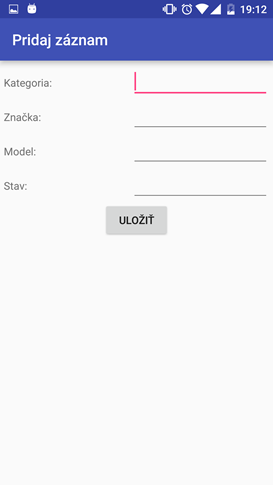
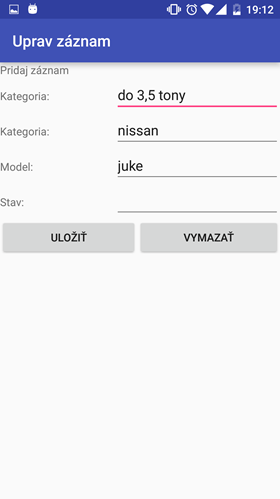
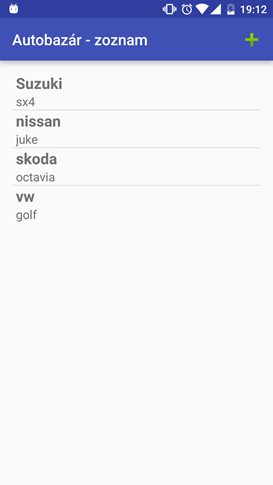
Aplikácia pozostáva z troch aktivít. Prvá aktivita obsahuje zoznam dát z tabuľky (ListView) a tlačidlo pridaj ďalší záznam (tlačidlo sa nachádza v panely nástrojov ActionBar). Druhá aktivita – pridanie záznamu, táto aktivita sa spustí po kliknutí na tlačidlo pridaj záznam. Po kliknití na tlačidlo „Uložiť“ sa záznam uloží do databázy a načíta sa hlavná aktivita – zoznam záznamov. Po kliknutí na ľubovoľný záznam sa otvorí tretia aktivita – uprav záznam. V tejto aktivite sa predvyplnia záznamy podľa identifikátora (id riadku) a používateľ môže upraviť alebo vymazať daný riadok.
DataModel.java

Java Kotlin
public class DataModel extends SQLiteOpenHelper {

    public static final String TABULKA_ID = "_id";
    public static final String TABULKA_KATEGORIA = "kategoria";
    public static final String TABULKA_ZNACKA = "znacka";
    public static final String TABULKA_MODEL = "model";
    public static final String TABULKA_STAV = "stav";
    protected static final String DB_NAZOV = "dbAutobazar";
    protected static final int DB_VERZIA = 1;
    protected static final String DB_TABULKA = "tabulkaAutobazar";

    /*
     * @param context to use to open or create the database
     * @param name of the database file, or null for an in-memory database
     * @param factory to use for creating cursor objects, or null for the default
     * @param version number of the database (starting at 1); if the database is older,
     */
    public DataModel(Context c) {

        super(c, DB_NAZOV, null, DB_VERZIA);


    }

    @Override
    public void onCreate(SQLiteDatabase db) {
        //metóda execSQL() sa môže použiť iba pre príkazy, ktoré nevracajú údaje
        //pomocou tejto metódy dokážeme zadať ľubovoľný dotaz
        db.execSQL("CREATE TABLE " + DB_TABULKA
                + "(" + TABULKA_ID + " INTEGER PRIMARY KEY,"

                + TABULKA_KATEGORIA + " TEXT,"
                + TABULKA_ZNACKA + " TEXT,"
                + TABULKA_MODEL + " TEXT,"
                + TABULKA_STAV + " TEXT );");
    }


    @Override
    public void onUpgrade(SQLiteDatabase db, int oldVersion, int newVersion) {
        //voláme v prípade, že je verzia DB v zariadení staršia ako hodnota v parametroch
// konštruktora rodičovskej triedy SQLiteOpenHelper
        String query = "DROP TABLE IF EXISTS " + DB_TABULKA;

        db.execSQL(query);
        onCreate(db);
    }

    // @atributy je dátová štruktúra typu Map
    public long vlozZaznam(HashMap<String, String> atributy) {

        //getWritableDatabase() - objekt SQLiteDatabase môže zapisovať a čítať
        SQLiteDatabase db = this.getWritableDatabase();

        //vkladané údaje sú zapúzdrené v objekte typu ContentValues (ktoré vkladáme pomocou metódy put()
        ContentValues val = new ContentValues();

        val.put(TABULKA_KATEGORIA, atributy.get(TABULKA_KATEGORIA));
        val.put(TABULKA_ZNACKA, atributy.get(TABULKA_ZNACKA));
        val.put(TABULKA_MODEL, atributy.get(TABULKA_MODEL));
        val.put(TABULKA_STAV, atributy.get(TABULKA_STAV));
        //metóda insert() vkladá údaje do DB, ako parametre obsahuje názov tabulky, null-sql nedovoluje
//vkladať prázdny riadok-null vloží NULL hodnotu, objekt ContentValues
        long id = db.insert(DB_TABULKA, null, val);

        db.close();
        //metóda vráti vygenerovaný identifikátor. Ak sa vloženie nepodarilo, vráti hodnotu -1

        return id;

    }

    public int aktualizujZaznam(HashMap<String, String> atributy) {
        SQLiteDatabase db = this.getWritableDatabase();
        ContentValues val = new ContentValues();
        val.put(TABULKA_KATEGORIA, atributy.get(TABULKA_KATEGORIA));
        val.put(TABULKA_ZNACKA, atributy.get(TABULKA_ZNACKA));
        val.put(TABULKA_MODEL, atributy.get(TABULKA_MODEL));
        val.put(TABULKA_STAV, atributy.get(TABULKA_STAV));
        //metoda update(String tabulka, ContentValues val, String podmienkaKde, String[] podmienka)
        return db.update(DB_TABULKA, val, TABULKA_ID + " = ?", new String[]{atributy.get(TABULKA_ID)});

    }

    public void vymazZaznam(String id) {
        SQLiteDatabase db = this.getWritableDatabase();
        String deleteQuery = "DELETE FROM " + DB_TABULKA + " WHERE _id='" + id + "'";
        db.execSQL(deleteQuery);
    }

    //vráti konkrétny záznam (objekt typu HASHMAP na základe id
    public HashMap<String, String> vypisZaznam(String id) {

        HashMap<String, String> zaznam = new HashMap<String, String>();
        String selectQuery = "SELECT * FROM " + DB_TABULKA + " WHERE _id='" + id + "'";
        SQLiteDatabase db = this.getWritableDatabase();
        Cursor cursor = db.rawQuery(selectQuery, null);

        if (cursor.moveToFirst()) {
            do {
                zaznam.put(TABULKA_ID, cursor.getString(0));
                zaznam.put(TABULKA_KATEGORIA, cursor.getString(1));
                zaznam.put(TABULKA_ZNACKA, cursor.getString(2));
                zaznam.put(TABULKA_MODEL, cursor.getString(3));
                zaznam.put(TABULKA_STAV, cursor.getString(4));
                //kurzor sa presunie na ďalší riadok
            } while (cursor.moveToNext());

        }
        return zaznam;
    }

    //vráti všetky záznamy
    public ArrayList<HashMap<String, String>> vypisZaznamy() {

        ArrayList<HashMap<String, String>> zaznamy = new ArrayList<HashMap<String, String>>();
        String selectQuery = "SELECT * FROM " + DB_TABULKA;
        SQLiteDatabase db = this.getWritableDatabase();
        Cursor cursor = db.rawQuery(selectQuery, null);

        if (cursor.moveToFirst()) {
            do {
                HashMap<String, String> hm = new HashMap<String, String>();
                hm.put(TABULKA_ID, cursor.getString(0));
                hm.put(TABULKA_KATEGORIA, cursor.getString(1));
                hm.put(TABULKA_ZNACKA, cursor.getString(2));
                hm.put(TABULKA_MODEL, cursor.getString(3));
                hm.put(TABULKA_STAV, cursor.getString(4));
                zaznamy.add(hm);
                //kurzor sa presunie na ďalší riadok
            } while (cursor.moveToNext());

        }
        return zaznamy;
    }
}

class DataModel(context: Context) : SQLiteOpenHelper(context, DB_NAZOV, null, DB_VERZIA) {

    companion object {
        const val TABULKA_ID = "_id"
        const val TABULKA_KATEGORIA = "kategoria"
        const val TABULKA_ZNACKA = "znacka"
        const val TABULKA_MODEL = "model"
        const val TABULKA_STAV = "stav"
        const val DB_NAZOV = "dbAutobazar"
        const val DB_VERZIA = 1
        const val DB_TABULKA = "tabulkaAutobazar"
    }

    override fun onCreate(db: SQLiteDatabase) {
        // Používame execSQL na vytvorenie tabuľky
        db.execSQL("""
            CREATE TABLE $DB_TABULKA (
                $TABULKA_ID INTEGER PRIMARY KEY,
                $TABULKA_KATEGORIA TEXT,
                $TABULKA_ZNACKA TEXT,
                $TABULKA_MODEL TEXT,
                $TABULKA_STAV TEXT
            );
        """.trimIndent())
    }

    override fun onUpgrade(db: SQLiteDatabase, oldVersion: Int, newVersion: Int) {
        // Vymazanie starej tabuľky a vytvorenie novej pri zmene verzie DB
        db.execSQL("DROP TABLE IF EXISTS $DB_TABULKA")
        onCreate(db)
    }

    // Vloží záznam do databázy
    fun vlozZaznam(atributy: Map<String, String>): Long {
        val db = writableDatabase
        val values = ContentValues().apply {
            put(TABULKA_KATEGORIA, atributy[TABULKA_KATEGORIA])
            put(TABULKA_ZNACKA, atributy[TABULKA_ZNACKA])
            put(TABULKA_MODEL, atributy[TABULKA_MODEL])
            put(TABULKA_STAV, atributy[TABULKA_STAV])
        }
        return db.insert(DB_TABULKA, null, values)
    }

    // Aktualizuje záznam podľa ID
    fun aktualizujZaznam(atributy: Map<String, String>): Int {
        val db = writableDatabase
        val values = ContentValues().apply {
            put(TABULKA_KATEGORIA, atributy[TABULKA_KATEGORIA])
            put(TABULKA_ZNACKA, atributy[TABULKA_ZNACKA])
            put(TABULKA_MODEL, atributy[TABULKA_MODEL])
            put(TABULKA_STAV, atributy[TABULKA_STAV])
        }
        return db.update(DB_TABULKA, values, "$TABULKA_ID = ?", arrayOf(atributy[TABULKA_ID]))
    }

    // Vymaže záznam podľa ID
    fun vymazZaznam(id: String) {
        val db = writableDatabase
        val deleteQuery = "DELETE FROM $DB_TABULKA WHERE $TABULKA_ID = ?"
        db.execSQL(deleteQuery, arrayOf(id))
    }

    // Vráti konkrétny záznam ako Mapu
    fun vypisZaznam(id: String): Map<String, String>? {
        val db = writableDatabase
        val selectQuery = "SELECT * FROM $DB_TABULKA WHERE $TABULKA_ID = ?"
        db.rawQuery(selectQuery, arrayOf(id)).use { cursor ->
            return if (cursor.moveToFirst()) {
                mapOf(
                    TABULKA_ID to cursor.getString(0),
                    TABULKA_KATEGORIA to cursor.getString(1),
                    TABULKA_ZNACKA to cursor.getString(2),
                    TABULKA_MODEL to cursor.getString(3),
                    TABULKA_STAV to cursor.getString(4)
                )
            } else {
                null
            }
        }
    }

    // Vráti všetky záznamy ako zoznam Map
    fun vypisZaznamy(): List<Map<String, String>> {
        val db = writableDatabase
        val selectQuery = "SELECT * FROM $DB_TABULKA"
        val zaznamy = mutableListOf<Map<String, String>>()

        db.rawQuery(selectQuery, null).use { cursor ->
            if (cursor.moveToFirst()) {
                do {
                    val zaznam = mapOf(
                        TABULKA_ID to cursor.getString(0),
                        TABULKA_KATEGORIA to cursor.getString(1),
                        TABULKA_ZNACKA to cursor.getString(2),
                        TABULKA_MODEL to cursor.getString(3),
                        TABULKA_STAV to cursor.getString(4)
                    )
                    zaznamy.add(zaznam)
                } while (cursor.moveToNext())
            }
        }

        return zaznamy
    }
}


 MainActivity.java

Java Kotlin
public class MainActivity extends AppCompatActivity
{
    private ListView mListView;
    DataModel dataModel = new DataModel(this);
    @Override
    protected void onCreate(Bundle savedInstanceState) {
        super.onCreate(savedInstanceState);
        setContentView(R.layout.activity_main);

        //nastavenie textu do action baru
        getSupportActionBar().setTitle("Autobazár - zoznam");


        //udaje z DB budú uložené v premennej autobazarList
        ArrayList<HashMap<String,String>> autobazarList = dataModel.vypisZaznamy();


        if (autobazarList.size()!=0) {
            ListView lw = getListView();
            //po kliknutí na nejaký riadok sa otvorí nová aktivita UpravZaznam.class
            lw.setOnItemClickListener(new AdapterView.OnItemClickListener() {

                @Override
                public void onItemClick(AdapterView<?> parent, View view, int position, long id) {
                    //zistíme jedinečný identifikátor riadku a pošleme ho ako parameter do dalšej aktivity
                    TextView tabulka_id = view.findViewById(R.id.tabulka_id);


                    //po kliknuti otvor novu aktivitu
                    Intent intent = new Intent(getApplication(), UpravZaznam.class);

                    intent.putExtra("tabulka_id", tabulka_id.getText().toString());
                    intent.addFlags(Intent.FLAG_ACTIVITY_NO_ANIMATION);
                    startActivity(intent);
                }
            });

            ListAdapter adapter = new SimpleAdapter(MainActivity.this, autobazarList, R.layout.item, new String[]
{"_id","znacka","model"}, new int[] {R.id.tabulka_id, R.id.tabulka_znacka, R.id.tabulka_model});

            setListAdapter(adapter);
        }
    }

    //vlastne metody pre ListView - v pripade dedenia z triedy ListActivity ich nepotrebujem - mam getListView(),
    protected ListView getListView() {

        if (mListView == null) {
            mListView = (ListView) findViewById(android.R.id.list);
        }
        return mListView;
    }

    protected void setListAdapter(ListAdapter adapter) {
        getListView().setAdapter(adapter);
    }

    //nastavenie menu v action bare
    @Override

    public boolean onCreateOptionsMenu(Menu menu) {

        MenuInflater inflater = getMenuInflater();
        inflater.inflate(R.menu.menu_main, menu);

        return super.onCreateOptionsMenu(menu);
    }

    @Override
    public boolean onOptionsItemSelected(MenuItem item) {

        switch (item.getItemId()) {
            case R.id.action_pridat:
                Intent intent = new Intent(getApplication(), PridajZaznam.class);
                intent.addFlags(Intent.FLAG_ACTIVITY_NO_ANIMATION);
                startActivity(intent);
            default:
                return super.onOptionsItemSelected(item);
        }
    }

}

class MainActivity : AppCompatActivity() {
    private var mListView: ListView? = null
    private val dataModel = DataModel(this)

    override fun onCreate(savedInstanceState: Bundle?) {
        super.onCreate(savedInstanceState)
        setContentView(R.layout.activity_main)

        // Nastavenie textu do action baru
        supportActionBar?.title = "Autobazár - zoznam"

        // Údaje z DB budú uložené v premennej autobazarList
        val autobazarList = dataModel.vypisZaznamy()

        if (autobazarList.isNotEmpty()) {
            val lw = getListView()

            // Po kliknutí na riadok sa otvorí nová aktivita UpravZaznam
            lw.setOnItemClickListener { parent, view, position, id ->
                val tabulkaId: TextView = view.findViewById(R.id.tabulka_id)

                // Po kliknutí otvor novú aktivitu
                val intent = Intent(applicationContext, UpravZaznam::class.java)
                intent.putExtra("tabulka_id", tabulkaId.text.toString())
                intent.addFlags(Intent.FLAG_ACTIVITY_NO_ANIMATION)
                startActivity(intent)
            }

            // Nastavenie adaptéra
            val adapter = SimpleAdapter(
                this@MainActivity,
                autobazarList,
                R.layout.item,
                arrayOf("_id", "znacka", "model"),
                intArrayOf(R.id.tabulka_id, R.id.tabulka_znacka, R.id.tabulka_model)
            )
            setListAdapter(adapter)
        }
    }

    // Vlastné metódy pre ListView - v prípade dedenia z triedy ListActivity ich nepotrebujem - mám getListView()
    protected fun getListView(): ListView {
        if (mListView == null) {
            mListView = findViewById(android.R.id.list)
        }
        return mListView!!
    }

    protected fun setListAdapter(adapter: ListAdapter) {
        getListView().adapter = adapter
    }

    // Nastavenie menu v action bare
    override fun onCreateOptionsMenu(menu: Menu?): Boolean {
        val inflater = menuInflater
        inflater.inflate(R.menu.menu_main, menu)
        return super.onCreateOptionsMenu(menu)
    }

    override fun onOptionsItemSelected(item: MenuItem): Boolean {
        return when (item.itemId) {
            R.id.action_pridat -> {
                val intent = Intent(applicationContext, PridajZaznam::class.java)
                intent.addFlags(Intent.FLAG_ACTIVITY_NO_ANIMATION)
                startActivity(intent)
                true
            }
            else -> super.onOptionsItemSelected(item)
        }
    }
}


 PridajZaznam.java

Java Kotlin
public class PridajZaznam extends AppCompatActivity {

    DataModel dataModel = new DataModel(this);
    EditText edt_kategoria;
    EditText edt_znacka;
    EditText edt_model;
    EditText edt_stav;

    @Override
    protected void onCreate(Bundle savedInstanceState) {
        super.onCreate(savedInstanceState);
        setContentView(R.layout.pridaj_zaznam);

        //nastavenie textu do action baru
        getSupportActionBar().setTitle("Pridaj záznam");

         edt_kategoria = findViewById(R.id.edt_kategoria);
         edt_znacka = findViewById(R.id.edt_znacka);
         edt_model = findViewById(R.id.edt_model);
         edt_stav = findViewById(R.id.edt_stav);
    }

    //onClick metoda tlacidla pridaj zaznam
    public void pridajZaznam(View view) {
        HashMap<String,String> query = new HashMap<String,String>();

        query.put(DataModel.TABULKA_KATEGORIA,edt_kategoria.getText().toString());
        query.put(DataModel.TABULKA_ZNACKA,edt_znacka.getText().toString());
        query.put(DataModel.TABULKA_MODEL,edt_model.getText().toString());
        query.put(DataModel.TABULKA_STAV,edt_stav.getText().toString());

        dataModel.vlozZaznam(query);

        Intent intent = new Intent(getApplication(), MainActivity.class);
        intent.addFlags(Intent.FLAG_ACTIVITY_NO_ANIMATION);
        startActivity(intent);
    }
}

class PridajZaznam : AppCompatActivity() {

    private val dataModel = DataModel(this)
    private lateinit var edtKategoria: EditText
    private lateinit var edtZnacka: EditText
    private lateinit var edtModel: EditText
    private lateinit var edtStav: EditText

    override fun onCreate(savedInstanceState: Bundle?) {
        super.onCreate(savedInstanceState)
        setContentView(R.layout.pridaj_zaznam)

        // Nastavenie textu do action baru
        supportActionBar?.title = "Pridaj záznam"

        edtKategoria = findViewById(R.id.edt_kategoria)
        edtZnacka = findViewById(R.id.edt_znacka)
        edtModel = findViewById(R.id.edt_model)
        edtStav = findViewById(R.id.edt_stav)
    }

    // onClick metóda tlačidla pridaj záznam
    fun pridajZaznam(view: View) {
        val query = hashMapOf<String, String>()

        query[DataModel.TABULKA_KATEGORIA] = edtKategoria.text.toString()
        query[DataModel.TABULKA_ZNACKA] = edtZnacka.text.toString()
        query[DataModel.TABULKA_MODEL] = edtModel.text.toString()
        query[DataModel.TABULKA_STAV] = edtStav.text.toString()

        dataModel.vlozZaznam(query)

        // Po pridaní záznamu sa presmerujeme späť na hlavnú obrazovku
        val intent = Intent(applicationContext, MainActivity::class.java)
        intent.addFlags(Intent.FLAG_ACTIVITY_NO_ANIMATION)
        startActivity(intent)
    }
}


 UpravZaznam.java

Java Kotlin
public class UpravZaznam extends AppCompatActivity {

    DataModel dataModel = new DataModel(this);
    EditText edt_kategoria;
    EditText edt_znacka;
    EditText edt_model;
    EditText edt_stav;
    String tabulka_id;

    @Override
    protected void onCreate(Bundle savedInstanceState) {
        super.onCreate(savedInstanceState);
        setContentView(R.layout.uprav_zaznam);

        //nastavenie textu do action baru
        getSupportActionBar().setTitle("Uprav záznam");


        edt_kategoria = findViewById(R.id.edt_kategoria);
        edt_znacka = findViewById(R.id.edt_znacka);
        edt_model = findViewById(R.id.edt_model);
        edt_stav = findViewById(R.id.edt_stav);

        //ziskaj parameter poslany z predchadzajuceho okna = id
        Intent intent = getIntent();

        tabulka_id = intent.getStringExtra("tabulka_id");

        HashMap<String,String> hm = dataModel.vypisZaznam(tabulka_id);
        if (hm.size() != 0) {
            edt_kategoria.setText(hm.get(DataModel.TABULKA_KATEGORIA));
            edt_znacka.setText(hm.get(DataModel.TABULKA_ZNACKA));
            edt_model.setText(hm.get(DataModel.TABULKA_MODEL));
            edt_stav.setText(hm.get(DataModel.TABULKA_STAV));
        }
    }

    //onClick metoda tlacidla pridaj zaznam
    public void ulozitZaznam(View view) {

        HashMap<String,String> query = new HashMap<String,String>();

        query.put(DataModel.TABULKA_ID,tabulka_id);
        query.put(DataModel.TABULKA_KATEGORIA,edt_kategoria.getText().toString());
        query.put(DataModel.TABULKA_ZNACKA,edt_znacka.getText().toString());
        query.put(DataModel.TABULKA_MODEL,edt_model.getText().toString());
        query.put(DataModel.TABULKA_STAV,edt_stav.getText().toString());

        dataModel.aktualizujZaznam(query);

        Intent intent = new Intent(getApplication(), MainActivity.class);
        intent.addFlags(Intent.FLAG_ACTIVITY_NO_ANIMATION);
        startActivity(intent);
    }

    public void vymazatZaznam(View view){
        dataModel.vymazZaznam(tabulka_id);

        Intent intent = new Intent(getApplication(), MainActivity.class);
        startActivity(intent);

    }
}

class UpravZaznam : AppCompatActivity() {

    private val dataModel = DataModel(this)
    private lateinit var edtKategoria: EditText
    private lateinit var edtZnacka: EditText
    private lateinit var edtModel: EditText
    private lateinit var edtStav: EditText
    private lateinit var tabulkaId: String

    override fun onCreate(savedInstanceState: Bundle?) {
        super.onCreate(savedInstanceState)
        setContentView(R.layout.uprav_zaznam)

        // Nastavenie textu do action baru
        supportActionBar?.title = "Uprav záznam"

        edtKategoria = findViewById(R.id.edt_kategoria)
        edtZnacka = findViewById(R.id.edt_znacka)
        edtModel = findViewById(R.id.edt_model)
        edtStav = findViewById(R.id.edt_stav)

        // Získaj parameter poslaný z predchádzajúceho okna = id
        val intent = intent
        tabulkaId = intent.getStringExtra("tabulka_id") ?: ""

        val hm = dataModel.vypisZaznam(tabulkaId)
        if (hm.isNotEmpty()) {
            edtKategoria.setText(hm[DataModel.TABULKA_KATEGORIA])
            edtZnacka.setText(hm[DataModel.TABULKA_ZNACKA])
            edtModel.setText(hm[DataModel.TABULKA_MODEL])
            edtStav.setText(hm[DataModel.TABULKA_STAV])
        }
    }

    // onClick metóda tlačidla uložiť záznam
    fun ulozitZaznam(view: View) {
        val query = hashMapOf<String, String>()

        query[DataModel.TABULKA_ID] = tabulkaId
        query[DataModel.TABULKA_KATEGORIA] = edtKategoria.text.toString()
        query[DataModel.TABULKA_ZNACKA] = edtZnacka.text.toString()
        query[DataModel.TABULKA_MODEL] = edtModel.text.toString()
        query[DataModel.TABULKA_STAV] = edtStav.text.toString()

        dataModel.aktualizujZaznam(query)

        val intent = Intent(applicationContext, MainActivity::class.java)
        intent.addFlags(Intent.FLAG_ACTIVITY_NO_ANIMATION)
        startActivity(intent)
    }

    // onClick metóda tlačidla vymazať záznam
    fun vymazatZaznam(view: View) {
        dataModel.vymazZaznam(tabulkaId)

        val intent = Intent(applicationContext, MainActivity::class.java)
        startActivity(intent)
    }
}


 activity_main.xml

<?xml version="1.0" encoding="utf-8"?>
<TableLayout xmlns:android="http://schemas.android.com/apk/res/android"
    xmlns:tools="http://schemas.android.com/tools"
    android:id="@+id/activity_data_model"
    android:layout_width="match_parent"
    android:layout_height="match_parent"
    android:paddingBottom="@dimen/activity_vertical_margin"
    android:paddingLeft="@dimen/activity_horizontal_margin"
    android:paddingRight="@dimen/activity_horizontal_margin"
    android:paddingTop="@dimen/activity_vertical_margin"
    tools:context="p_v.databaza.MainActivity">

    <TableRow
        android:id="@+id/riadok2"
        android:layout_width="match_parent"
        android:layout_height="wrap_content">

        <ListView
            android:id="@android:id/list"
            android:layout_width="match_parent"
            android:layout_height="wrap_content"
            android:layout_weight="1"></ListView>
    </TableRow>


</TableLayout>


item.xml

<?xml version="1.0" encoding="utf-8"?>
<TableRow xmlns:android="http://schemas.android.com/apk/res/android"
    android:layout_width="match_parent"
    android:layout_height="wrap_content"
    android:paddingLeft="5dp">


<LinearLayout
    android:layout_width="match_parent"
    android:layout_height="wrap_content"
    android:orientation="vertical">
    <TextView
        android:id="@+id/tabulka_id"
        android:layout_height="wrap_content"
        android:layout_width="wrap_content"
        android:visibility="gone"
        />
    <TextView
        android:id="@+id/tabulka_znacka"
        android:layout_height="wrap_content"
        android:layout_width="wrap_content"
        android:textSize="20dp"
        android:textStyle="bold"
        />

    <TextView
        android:id="@+id/tabulka_model"
        android:layout_height="wrap_content"
        android:layout_width="wrap_content"
        android:textSize="16dp"
        />

</LinearLayout>

</TableRow>

pridaj_zaznam.xml

<?xml version="1.0" encoding="utf-8"?>
<TableLayout xmlns:android="http://schemas.android.com/apk/res/android"
    android:layout_width="match_parent"
    android:layout_height="match_parent"
    android:layout_marginBottom="5dp"
    android:layout_marginLeft="5dp"
    android:layout_marginRight="5dp"
    android:layout_marginTop="5dp">


    <TableRow
        android:id="@+id/riadok1_kategoria"
        android:layout_width="match_parent"
        android:layout_height="wrap_content">

        <TextView
            android:id="@+id/txt_kategoria"
            android:layout_width="match_parent"
            android:layout_height="wrap_content"
            android:layout_weight="0.5"
            android:text="Kategoria:" />

        <EditText
            android:id="@+id/edt_kategoria"
            android:layout_width="match_parent"
            android:layout_height="wrap_content"
            android:layout_weight="1" />

    </TableRow>

    <TableRow
        android:id="@+id/riadok2_znacka"
        android:layout_width="match_parent"
        android:layout_height="wrap_content">

        <TextView
            android:id="@+id/txt_znacka"
            android:layout_width="match_parent"
            android:layout_height="wrap_content"
            android:layout_weight="0.5"
            android:text="Značka:" />

        <EditText
            android:id="@+id/edt_znacka"
            android:layout_width="match_parent"
            android:layout_height="wrap_content"
            android:layout_weight="1" />

    </TableRow>

    <TableRow
        android:id="@+id/riadok3_model"
        android:layout_width="match_parent"
        android:layout_height="wrap_content">

        <TextView
            android:id="@+id/txt_model"
            android:layout_width="match_parent"
            android:layout_height="wrap_content"
            android:layout_weight="0.5"
            android:text="Model:" />

        <EditText
            android:id="@+id/edt_model"
            android:layout_width="match_parent"
            android:layout_height="wrap_content"
            android:layout_weight="1" />

    </TableRow>

    <TableRow
        android:id="@+id/riadok4_stav"
        android:layout_width="match_parent"
        android:layout_height="wrap_content">

        <TextView
            android:id="@+id/txt_stav"
            android:layout_width="match_parent"
            android:layout_height="wrap_content"
            android:layout_weight="0.5"
            android:text="Stav:" />

        <EditText
            android:id="@+id/edt_stav"
            android:layout_width="match_parent"
            android:layout_height="wrap_content"
            android:layout_weight="1" />

    </TableRow>

    <TableRow
        android:id="@+id/riadok5_tlacidlo"
        android:layout_width="match_parent"
        android:layout_height="wrap_content"
        android:gravity="center">

        <Button
            android:id="@+id/btn_ulozit"
            android:layout_width="match_parent"
            android:layout_height="wrap_content"
            android:onClick="pridajZaznam"
            android:text="Uložiť" />


    </TableRow>

</TableLayout>


uprav_zaznam.xml

<?xml version="1.0" encoding="utf-8"?>
<TableLayout xmlns:android="http://schemas.android.com/apk/res/android"
    android:layout_width="match_parent"
    android:layout_height="match_parent">
    <TableRow
        android:id="@+id/riadok1_nadpis"
        android:layout_width="match_parent"
        android:layout_height="wrap_content">
        <TextView
            android:id="@+id/nadpis"
            android:layout_height="wrap_content"
            android:layout_width="match_parent"
            android:text="Pridaj záznam"/>

    </TableRow>
    <TableRow
        android:id="@+id/riadok2_kategoria"
        android:layout_width="match_parent"
        android:layout_height="wrap_content">
        <TextView
            android:id="@+id/txt_kategoria"
            android:layout_height="wrap_content"
            android:layout_width="match_parent"
            android:layout_weight="0.5"
            android:text="Kategoria:"/>
        <EditText
            android:id="@+id/edt_kategoria"
            android:layout_height="wrap_content"
            android:layout_width="match_parent"
            android:layout_weight="1"/>

    </TableRow>

    <TableRow
        android:id="@+id/riadok3_znacka"
        android:layout_width="match_parent"
        android:layout_height="wrap_content"
        android:orientation="horizontal">
        <TextView
            android:id="@+id/txt_znacka"
            android:layout_height="wrap_content"
            android:layout_width="match_parent"
            android:layout_weight="0.5"
            android:text="Kategoria:"/>

        <EditText
            android:id="@+id/edt_znacka"
            android:layout_height="wrap_content"
            android:layout_width="match_parent"
            android:layout_weight="1"/>

    </TableRow>

    <TableRow
        android:id="@+id/riadok4_model"
        android:layout_width="match_parent"
        android:layout_height="wrap_content"
        android:orientation="horizontal">
        <TextView
            android:id="@+id/txt_model"
            android:layout_height="wrap_content"
            android:layout_width="match_parent"
            android:layout_weight="0.5"
            android:text="Model:"/>
        <EditText
            android:id="@+id/edt_model"
            android:layout_height="wrap_content"
            android:layout_width="match_parent"
            android:layout_weight="1"/>

    </TableRow>

    <TableRow
        android:id="@+id/riadok5_stav"
        android:layout_width="match_parent"
        android:layout_height="wrap_content"
        android:orientation="horizontal">
        <TextView
            android:id="@+id/txt_stav"
            android:layout_height="wrap_content"
            android:layout_width="match_parent"
            android:layout_weight="0.5"
            android:text="Stav:"/>
        <EditText
            android:id="@+id/edt_stav"
            android:layout_height="wrap_content"
            android:layout_width="match_parent"
            android:layout_weight="1"/>

    </TableRow>

    <TableRow
        android:id="@+id/riadok6_tlacidlo"
        android:layout_width="match_parent"
        android:layout_height="wrap_content"
        android:orientation="horizontal">
        <Button
            android:id="@+id/btn_ulozit"
            android:layout_height="wrap_content"
            android:layout_width="match_parent"
            android:layout_weight="0.5"
            android:text="Uložiť"
            android:onClick="ulozitZaznam"/>
        <Button
            android:id="@+id/btn_vymazat"
            android:layout_height="wrap_content"
            android:layout_width="match_parent"
            android:layout_weight="0.5"
            android:text="Vymazať"
            android:onClick="vymazatZaznam"/>


    </TableRow>

</TableLayout>


menu_main.xml

<menu xmlns:android="http://schemas.android.com/apk/res/android"
    xmlns:app="http://schemas.android.com/apk/res-auto"
    xmlns:tools="http://schemas.android.com/tools" tools:context=".MainActivity">

    <item
        android:id="@+id/action_pridat"
        android:icon="@android:drawable/ic_input_add"
        android:title="add"
        app:showAsAction="ifRoom"
        android:actionProviderClass="android.widget.ShareActionProvider"
        />
</menu>